Live transcript
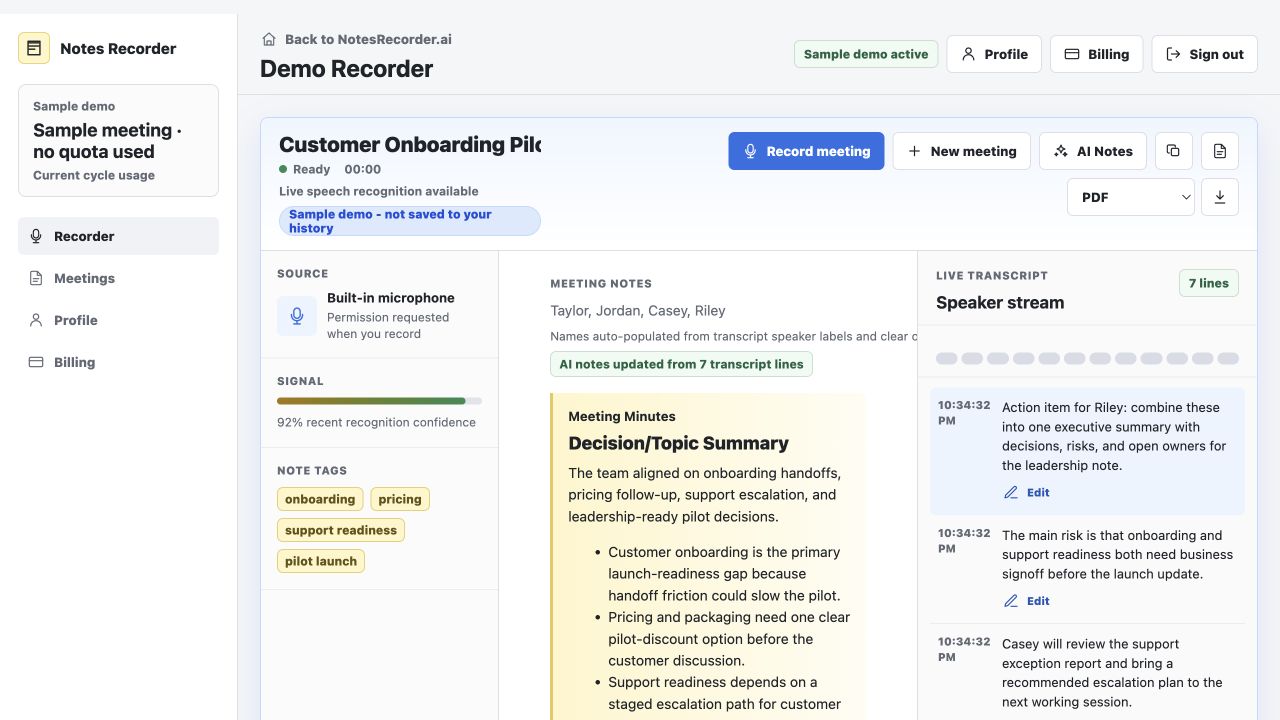
Speech appears beside the notes so the source stays visible.
 NotesRecorder.aiWeb app · Demo available
Meeting notes without a meeting bot
Record an authorized conversation through your browser microphone, follow the live transcript, and let AI organize the meeting into useful follow-up.
What it really does
It keeps the transcript visible while AI organizes an authorized conversation into summaries, decisions, risks, and action items. There is no meeting bot, desktop download, browser extension, or calendar connection.
How it works
Open the web app, authorize the microphone, and confirm that everyone has agreed to the recording.
Follow the live transcript and see structured notes form beside the conversation while you stay present.
Fix important details, then save, copy, or export the notes and transcript for the follow-up that comes next.
What you leave with
Designed for individual professionals handling follow-up after in-person meetings and speakerphone calls.
Speech appears beside the notes so the source stays visible.
Topic summaries, decisions, risks, and action items are separated for easier follow-up.
Review names and speaker labels when the transcript needs help.
Owners and dates appear only when the conversation supports them.
Copy notes or transcript separately, or export in text, CSV, Word-compatible, and print/PDF formats.
Best fit
Notes Recorder works best for in-person conversations and speakerphone calls that are clearly audible to the selected microphone.
Not the right fit
The product does not directly capture browser-tab or system audio, so a call heard only through headphones is not a good use case.
Review still matters
Review important decisions, owners, dates, and transcript details before sharing or acting. Notes Recorder is not a certified transcription or compliance service.
See it before you use it